Plan less. Lift more.
A workout planner and log for the gym floor. Build your week, follow it set by set while the rest timer runs itself, and watch the numbers climb. No account, no ads, and your training history never leaves your phone.
Free, with every feature included. Android and iPhone, and your backups move between them.
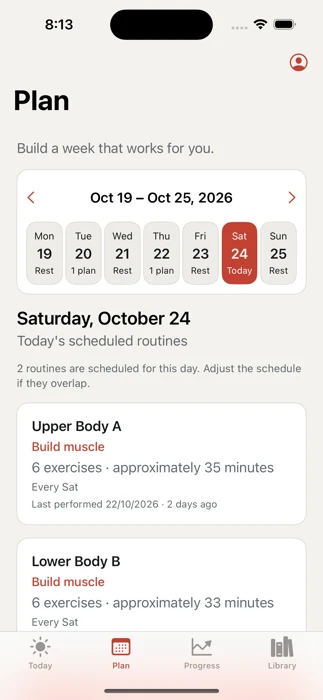
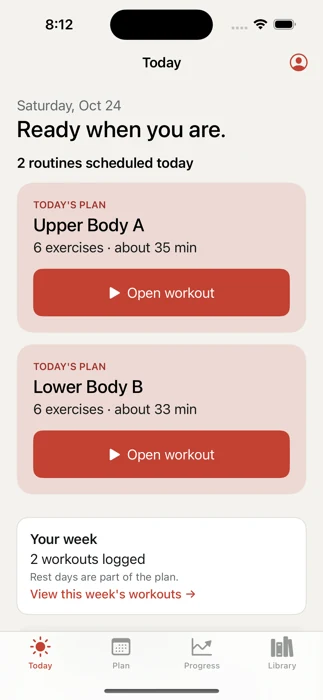
Ready when you are.
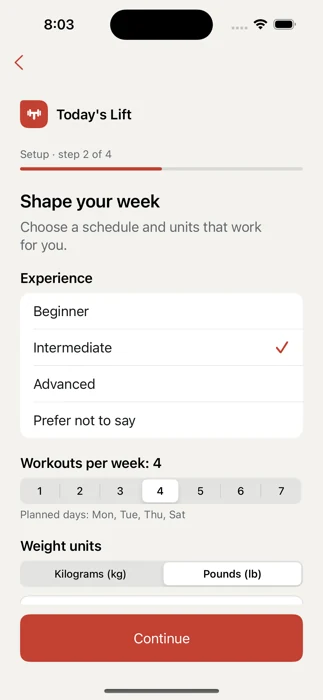
Shape your week
Pick your goal, experience, training days and the equipment you actually have. Today's Lift writes one editable routine for each day.
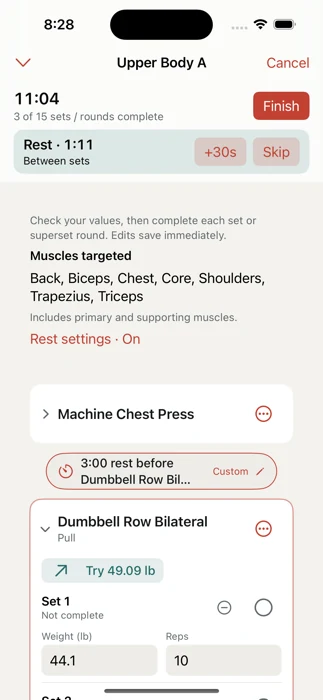
Train set by set
Press Start, log each set, and the rest countdown starts on its own. Skip it or add 30 seconds from the lock screen.
Watch it add up
Personal bests, charts and weekly consistency come straight from what you logged. Nothing to set up.
Built for the rack, not the couch.
The parts of a workout that usually break your focus are handled for you.
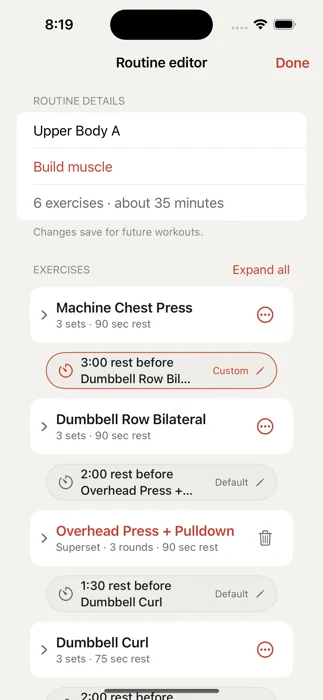
Rest that runs itselfA countdown after every set, a longer break between exercises, and a bell through your speaker or headphones. Set rest per exercise once and it's remembered.
Controls on the lock screenComplete set, Skip rest and +30 seconds without unlocking. On iPhone it lives in the Dynamic Island, and Siri can finish a set for you.
Plate math, doneType the plates on one side. The app records the real total, so "45 / side" is logged as 135 lb and your records stay honest.
Supersets as one flowDo A, then B, and one tap completes the round and starts the rest. Combine two exercises into a superset in place, even mid-workout.
A nudge when you're readyHit every target rep at the same weight two sessions running and a step-up hint suggests the next load. It never changes your routine on its own.
Back Squat
Lower Body A · Set 2 of 3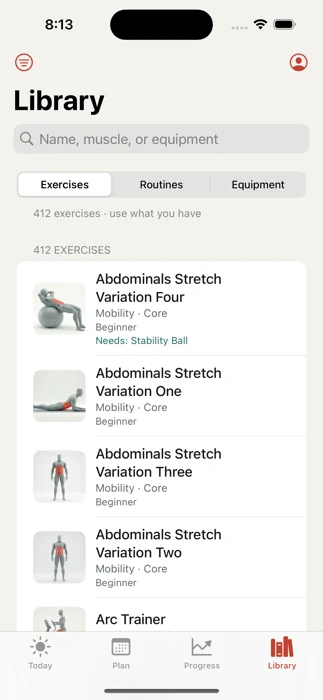
412 exercises, each with a demo.
Every exercise has a looping video, step-by-step instructions, the muscles it works and the mistakes to avoid. Search speaks gym, so you can type it the way you'd say it.
rdlRomanian deadlift
dbdumbbell
ohpoverhead press
Filter by muscle
Filter by equipmentYour own exercises and equipmentAdd a movement with your own notes, video and photo, or a machine your gym has that nobody else does.
Routines you can rearrangeDrag to reorder, collapse a long routine to fit on screen, copy one to start a variation, and schedule it on any day.
See the work turn into numbers.
Every finished workout feeds your history. Look back by week, month, a custom range or all time.
- Personal bests for every exercise, in kg or lb, with a chart of your strongest set each workout.
- Weekly consistency against your own target, with rest days and the week in progress left neutral.
- Totals that matter: workouts, sets, time trained and total load lifted.
- Notes and full history, grouped by month, every set still there when you open a workout.
Last 8 weeks
Target: 4 workouts a week6 of 7 finished weeks on target · 4-week streak
Your training log is yours. Not ours.
- No account. Open the app and start. No email, no password, nothing to sign up for.
- No ads, no tracking. There's no analytics or advertising kit inside the app.
- Works in a basement gym. Planning and logging work with no signal at all.
- Backups you hold. Save a backup file wherever you like and restore it on Android or iPhone.
my-training.tliftRestore it on any phoneWhy not just use a notebook?
| Today's Lift | Notebook or notes app | Typical workout app | |
|---|---|---|---|
| Rest timer with lock-screen controls | Built in | Separate timer | Usually |
| Exercise demos and instructions | 412, all included | No | Often paid |
| A weekly plan for your equipment | Yes | Write your own | Often paid |
| Records and progress charts | Automatic | Flip back through pages | Yes |
| Account required | No | No | Yes |
| Ads or subscription | Neither | Neither | Often one or both |
| Your history on a company's server | Never | No | Yes |
Good questions.
Is it really free?
Yes. Every feature is in the free app, with no ads and no subscription. If you'd like to chip in, there's an optional one-time Support development purchase in Settings. It unlocks nothing; it just says thanks.
What happens if I lose my phone?
Your workouts live on your phone, not on a server, so keep a backup. Settings → Your data saves a backup file wherever you like, such as your own cloud drive, and restoring it brings everything back.
Can I switch between Android and iPhone?
Yes. A backup made on one restores on the other, with your routines, history, custom exercises and settings.
Can I share a routine with a training partner?
Yes. Export routines saves just the routines you pick, with any custom exercises they use. Your partner imports the file and it's added alongside their own, with no schedule, history or personal details included.
Does it work without a signal?
Yes. Planning, logging, the rest timer and your history all work offline. Exercise videos are stored on your phone too.
Does it sync with a watch or a health app?
Not today. Today's Lift keeps your training in the app and doesn't read or write health data.
Is this from the maker of Today's Split?
Yes. Same developer, same idea: log it today, see where you stand over time, and keep your data to yourself. Have a look at Today's Split.
Show up. Log it. Lift more.
Free on Android and iPhone.